
Enhanced AWS Direct Connect Location Directory
When planning AWS Direct Connect deployments, one of the first challenges customers face is understanding where Direct Connect locations are physically located and what capabilities they offer. While AWS provides a list of Direct Connect locations, this page has several limitations that make it difficult to use for planning and decision-making purposes.
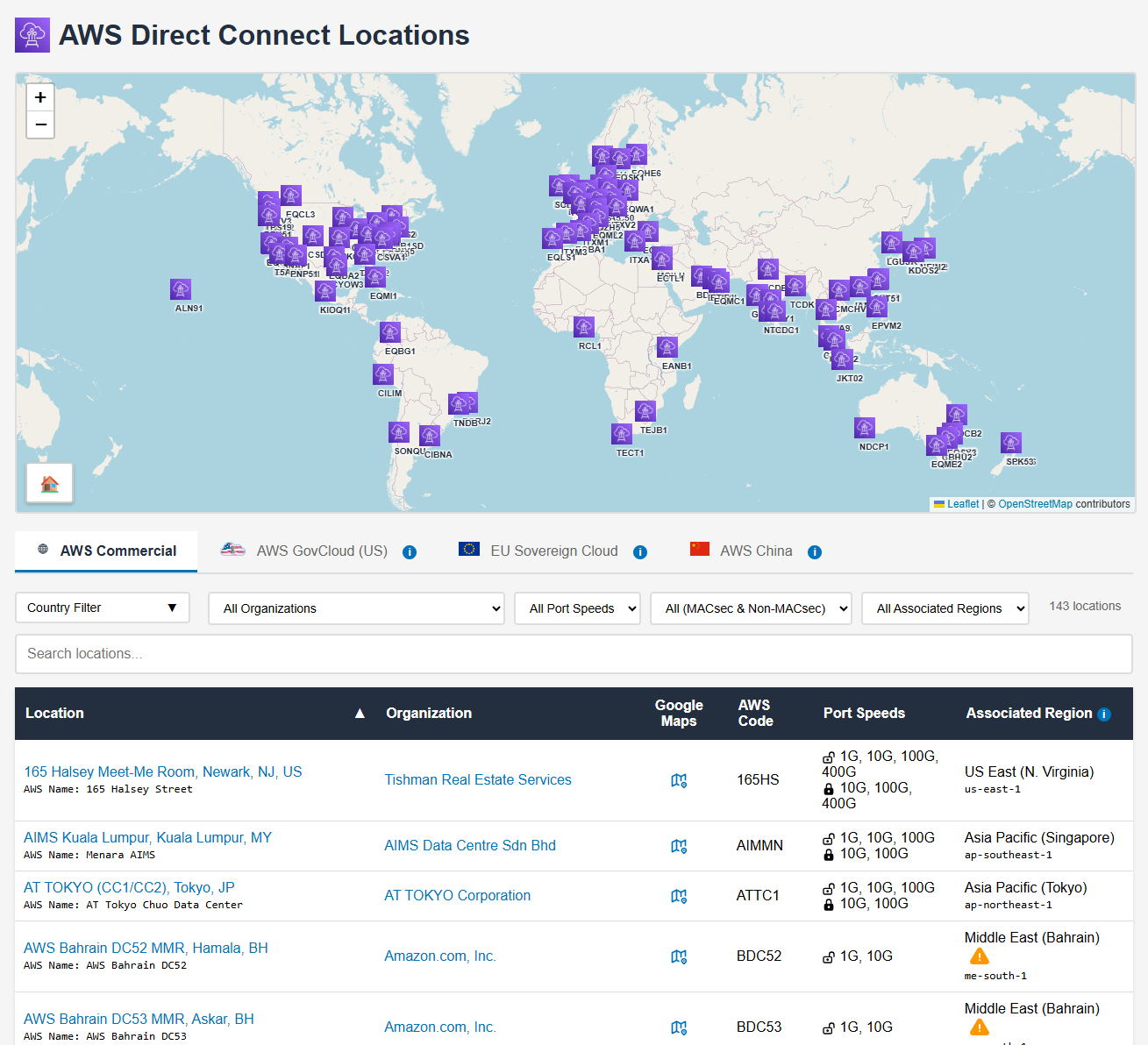
This article introduces the dx-location-details project, which addresses these limitations by providing an enhanced, interactive directory of AWS Direct Connect locations with geographic data, advanced filtering, and automated updates (see Figure 1).
The Problem with the Official AWS Page
The official AWS Direct Connect locations page at https://aws.amazon.com/directconnect/locations/ presents several challenges for customers:
Missing Geographic Information
The AWS page lists Direct Connect locations by name and associated AWS region, but provides no physical addresses, geographic coordinates, or mapping capabilities. This makes it difficult to:
- Visualize where locations are physically situated
- Identify the nearest Direct Connect location to your data center or office
- Plan for geographic redundancy across multiple locations
- Understand the physical distance between locations for latency planning
Regional Misclassification
Direct Connect locations are grouped by AWS region associations, which can be misleading. For example:
- A location in Tokyo might be listed under “Asia Pacific (Tokyo)” even though it can connect to any AWS region globally via Direct Connect Gateway
- A location in Dubai, UAE might appear under “Europe” due to using Dublin as the associated region, instead of appearing under Middle East
- Locations in the same city might appear under different regional groupings
- The grouping doesn’t reflect the actual geographic distribution of facilities
This regional grouping conflates the concept of “associated region” (used for API calls to manage Direct Connect resources) with physical location, creating confusion about where facilities actually exist.
Lack of Data Normalization
The AWS page presents location information in an inconsistent format:
- Location codes use various naming conventions without standardization
- Facility names may differ between AWS documentation and the actual colocation provider
- No structured data format makes it difficult to programmatically process the information
- Port speeds and MACsec support details are maintained manually instead of being retrieved from the API, leading to potential inconsistencies
- Missing details about facility operators
The Solution: dx-location-details
The dx-location-details GitHub repository provides an automated solution that addresses these limitations.
Interactive Map and Table Interface
The project generates an interactive web page at https://chris.elsen.xyz/dx-location-details/ featuring:
- Interactive world map: Visualize all Direct Connect locations with markers showing their precise geographic coordinates
- Sortable table: View detailed information about each location in a table format with sorting capabilities
- Advanced filtering: Filter locations by country, organization, port speeds, MACsec support, and associated AWS region
- Search functionality: Quickly find specific locations by name, code, or other attributes
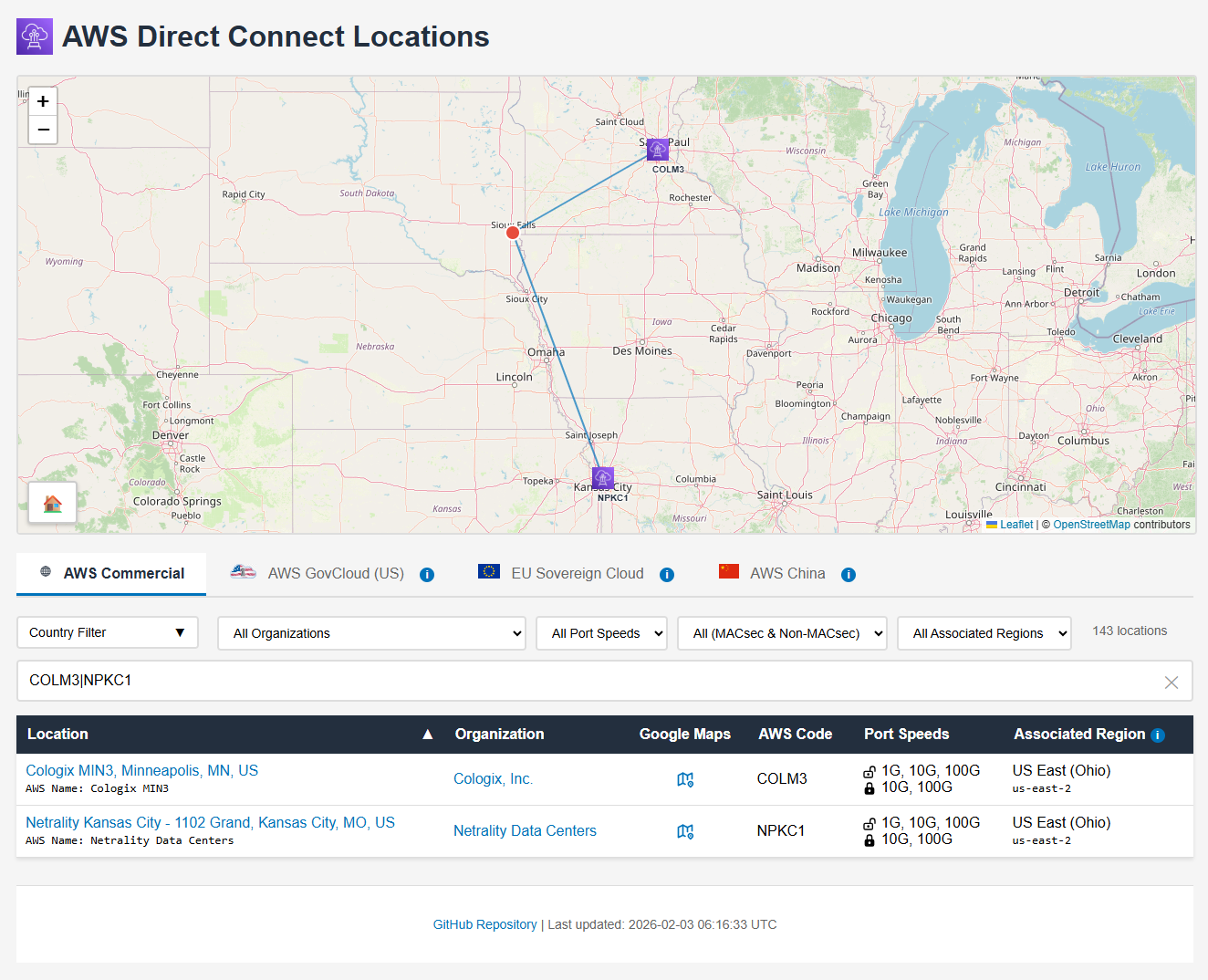
- Nearest location finder: Click anywhere on the map to identify the two closest Direct Connect locations based on geographic distance (see Figure 2). Note that this calculation uses straight-line distance and does not account for physical obstacles like oceans or the availability of existing fiber paths, so it should be used for rough guidance only
Location Data
For each Direct Connect location, the directory provides:
- Geographic coordinates: Precise latitude and longitude for mapping and distance calculations
- Facility information: Links to PeeringDB entries for detailed facility and operator information
- AWS location code: The standardized code used in AWS API calls
- Port speeds: Available connection speeds (1G, 10G, 100G, 400G)
- MACsec support: Which port speeds support MACsec encryption
- Associated region: The AWS region used for managing Direct Connect resources at this location. This helps identify locations associated with opt-in regions that must be enabled in your AWS account before the Direct Connect location can be used
- Organization details: The colocation provider or facility operator
Multi-Partition Support
The interface includes tabs for different AWS partitions:
- AWS Commercial: Standard AWS regions accessible globally
- AWS GovCloud (US): US government regions with special compliance requirements
- EU Sovereign Cloud: Isolated European partition for data sovereignty requirements
- AWS China: Isolated Chinese partition with separate operations
Each partition displays only the relevant Direct Connect locations, with appropriate filtering and mapping.
Note: Most colocation facilities in China are not listed in PeeringDB. For AWS China partition locations, geographic coordinates are obtained from alternative sources, resulting in lower location data fidelity and no PeeringDB facility links.
Automated Data Collection
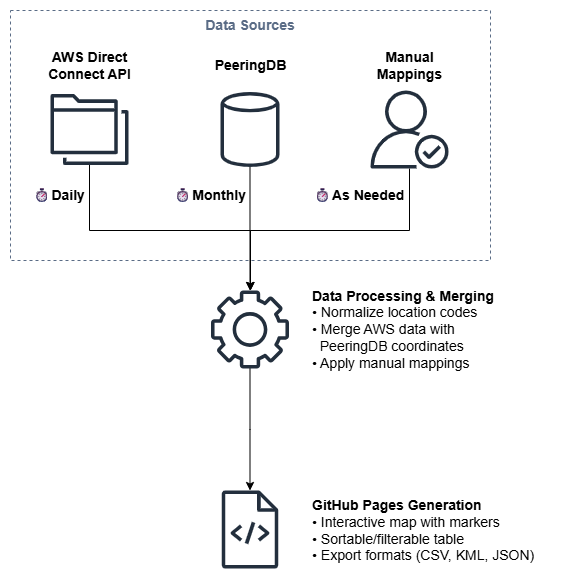
The repository implements an automated workflow to keep location data current (see Figure 3):
Daily Updates from AWS
A GitHub Actions workflow runs daily to:
- Query the AWS Direct Connect API across all regions
- Extract location information including codes, names, and available port speeds
- Normalize location codes (removing floor suffixes, MMR designations, etc.)
- Merge data with manually curated mappings to PeeringDB facilities
PeeringDB Integration
The project maintains mappings between AWS location codes and PeeringDB facility IDs.
PeeringDB is a freely available, user-maintained database of networks and interconnection data. Originally created to facilitate peering between networks, it has evolved into the de facto global registry of internet infrastructure, including colocation facilities, internet exchanges, and network presence. The database is maintained by over 16,000 registered users representing networks, facilities, and internet exchanges worldwide.
Integrating with PeeringDB makes sense for several reasons:
- Industry standard: PeeringDB is the authoritative source for colocation facility information used across the internet industry
- AWS alignment: Amazon is a Diamond sponsor of PeeringDB and heavily uses it for public peering coordination through the Amazon Global Network
- Complete data: Provides precise geographic coordinates, facility operator details, and links to specifications
- Community maintained: Regular updates from facility operators ensure data accuracy
- Standardized format: Structured data enables automated processing and integration
A monthly synchronization process updates:
- Geographic coordinates from PeeringDB
- Country codes and city names
- Facility operator details
- Organization information
Manual Mapping Maintenance
When AWS adds new Direct Connect locations, the repository includes an interactive tool (add_location.py) to:
- Identify unmapped location codes
- Search PeeringDB for matching facilities
- Add new mappings to the location database
- Validate coordinate accuracy
Note: Although I do work for AWS, no internal data is being used in this repository. Mapping of Direct Connect locations to PeeringDB locations is solely performed manually through public information.
Use Cases
This directory supports several practical use cases:
Selecting Nearest Locations
The interactive map allows customers to:
- Click on their data center location to find the nearest Direct Connect facilities
- Compare distances to multiple potential locations
- Evaluate whether to use local Direct Connect or work with a partner for extension
Evaluating Facility Capabilities
The detailed information helps customers:
- Identify which locations support required port speeds (100G, 400G)
- Determine MACsec availability for encryption requirements
- Research facility operators and their service offerings
- Access PeeringDB for additional facility details
Multi-Region Deployments
For customers with global AWS deployments:
- Filter locations by country or region
- Identify Direct Connect locations near regional offices
- Plan Direct Connect Gateway architectures spanning multiple regions
- Optimize for both cost and performance across geographieses
Summary
The dx-location-details project addresses gaps in the official AWS Direct Connect locations page by providing:
- Geographic visualization: Interactive map showing precise facility locations
- Enhanced filtering: Search and filter by multiple criteria including country, operator, and capabilities
- Normalized data: Consistent location codes and structured information
- Automated updates: Daily synchronization with AWS Direct Connect API
- Multiple export formats: CSV, KML, and JSON for various use cases
- PeeringDB integration: Links to detailed facility information
This enhanced directory simplifies Direct Connect planning by making it easy to identify suitable locations, evaluate facility capabilities, and plan for geographic redundancy. The automated update mechanism ensures the information stays current as AWS expands its Direct Connect footprint.
For customers planning AWS Direct Connect deployments, this tool provides the geographic and facility information needed to make informed decisions about location selection, redundancy planning, and partner engagement.
Visit https://chris.elsen.xyz/dx-location-details/ to explore the interactive directory, or access the GitHub repository to contribute mappings or use the data programmatically.
Leave a comment